

Since PC gaming is the most important part of the industry, it’s no surprise that more and more peripheral manufacturers have entered the market in recent years. While many of these don’t deliver quality products, there is one that has consistently provided high-quality gaming equipment that is not only the choice of the typical gamer, but also that of many esports athletes.
This company is Roccat, and this review focuses on one of its latest high-performance gaming mice – the Roccat Kone XP Air, a wireless, multi-functional, and stylish-looking piece of kit that might just have you switching from your current mouse of choice.
Design
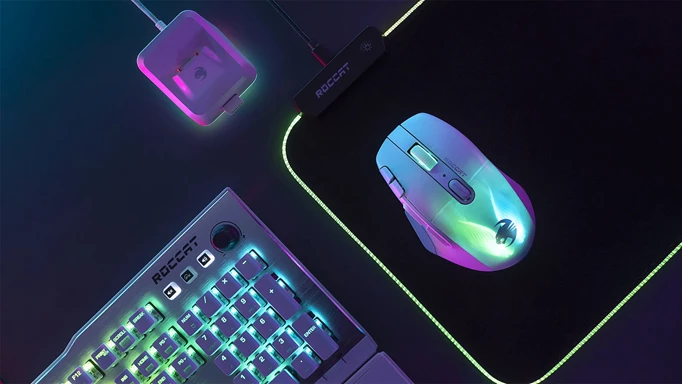
Looking first at the design of the Kone XP Air, it has the traditional Kone shape that’s been around for a few generations and I have to say it feels so nice in the hand. I didn’t experience any real fatigue when using it, unlike what I’ve felt using other gaming mice, making it extremely comfortable for longer gaming sessions. I’m also a big fan of a thumb rest in a mouse and while we’ll see why this one has a little trick up its sleeve, I definitely found myself relying on it for easier mouse movement.
As soon as you turn on the Kone XP Air, you are sure to notice the vibrant RGB lighting. It’s bright, colorful and has an almost 3D feel to it that I’m sure many will be a big fan of. For me, though, I would have liked it to be a bit more subtle, possibly with smaller RGB boxes rather than taking over almost the entire top of the mouse. What I love, however, is the implementation of RGB features, such as dimming the lighting as soon as you grab and move the mouse, and turning it off completely after standing still for a certain amount of time. Not only will this help improve the overall battery life of the Kone XP Air, but it won’t distract you when you’re doing other tasks in the same environment.
Speaking of battery life, the Kone Air XP comes with a charging dock that isn’t too overbearing and has a bit of RGB too. It’s easy to use and the mouse itself simply slides on for extremely easy charging. To connect it to your PC, just plug in the included USB-C cable and plug the dongle into the dock itself.
Finally, this may seem a bit trivial, but the actual clicking sound and feel of both the left and right functions is something that enhances that design aspect just that little bit further. It’s neither too loud nor quiet, and the click movement is just the right amount to give that satisfying feeling in an FPS game. This same feeling is also shared with the mouse wheel.
Functions
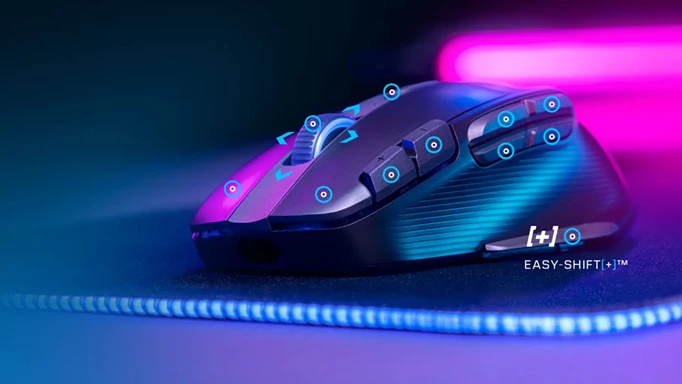
When we get to the features of the Kone XP Air, as with any mouse, there isn’t a crazy amount to talk about. It has all your usual bells and whistles – extra buttons, DPI controls, wireless functionality and RGB, but it’s the way Roccat implemented these that may set it apart from others.
Take the DPI adjustment for example. You sometimes find that on other mice this is a single button, perhaps under the scroll wheel or even under the body itself. On the Kone XP Air, however, you get a plus and a minus DPI button right next to your left click, so you can quickly adapt in the heat of battle if your current setup isn’t quite working.
The additional multifunction buttons share the same great placement and are more than reachable with your thumb. There are only four, which is more than enough for the games I normally play, but MMO players who want most of the features on their mouse may feel like this number will be a bit lacking.
I especially like the button on the thumb rest. Roccat filed this as Easy-Shift and it certainly lives up to its name. It not only made gaming inputs, but also working shortcuts to be pressed in an instant. I don’t think I could live without it now.
Wireless connectivity works as it should with two options available to you. You can opt for a simple Bluetooth connection if your device allows it, or you can plug in the corresponding dock and slot in the wireless adapter. Both options work perfectly, but I would definitely recommend using the dock for easy charging functionality, while also being quite aesthetically pleasing.
Performance
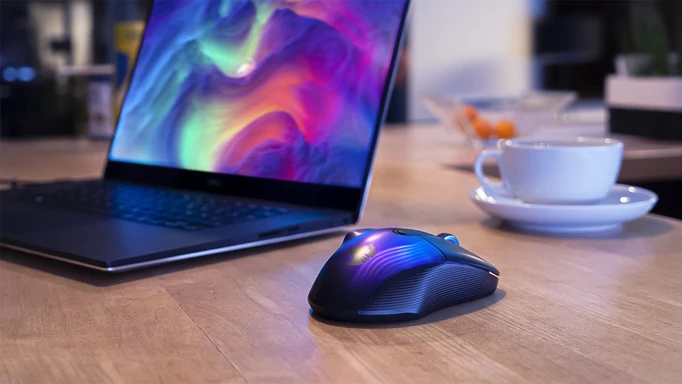
During my testing, I had no complaints at all about the mouse. It was sharp, it glides over the mouse pad and I didn’t have any problems with connectivity. You’d expect all this for such an expensive peripheral anyway, but you’d be surprised how many mice are a little bland in this department. All the extra buttons were perfect too. They all did what they had to do and had enough of a ‘click’ not to accidentally press. I was a little worried about that thumb rest button, but I don’t think I missed pressing it at any point, which is huge for intense gaming moments.
The battery life of the Kone XP Air is advertised at 100 hours and for me personally I can certainly agree with that. I’ve intentionally left the mouse on overnight a few times and it was good to go the next day at no extra cost. For how light the mouse is, I expected the battery to be adequate at best, but I really have no complaints in this area at all. Charging is just as great, as mentioned before, just slide it onto the dock and it fits snugly onto the charging pins and you’re ready for your next gaming session.
verdict
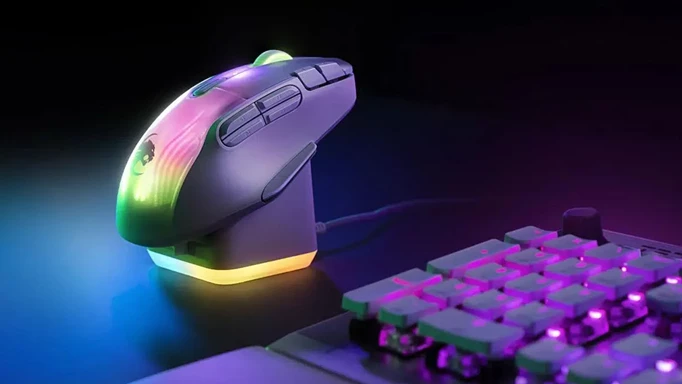
The Roccat Kone XP Air is probably one of the best feeling gaming mice I’ve used. The Kone shape that many know and love fits my hand almost perfectly, allowing for quick movements and less fatigue during long sessions. All the multifunction buttons are in easily accessible places and I especially love the thumb rest button, both for gaming and during work time, as it allows me to perform tasks more efficiently.
I’m not a big fan of how Roccat chose to implement the RGB because it looks a bit overbearing to my eyes. I would have preferred to see more ‘light bars’ than has been chosen here. However, I can see why it would be appealing, and if you’re already a fan of Roccat, this RGB setup will more than likely be for you. What I do like is its functionality, dimming when there are mouse movements and using a timer when there isn’t, extending the already fantastic battery life.
All in all, I would highly recommend the Roccat Kone XP Air gaming mouse. The multi-functionality coupled with the impressive performance is something that many of you will see for yourself, especially in nervous shooters. If you’re an MMO player, you might be a little short on the side buttons count, but in my opinion you could still get by.
The Kone XP Air is pricey, coming in at £149 ($170), so that’s definitely something to weigh up, but what you do get is a gaming mouse that’s sure to stand the test of time.
9/10
Received product for free.
0 Comments